Happy R dev; Linux & Emacs user; org of the Hungarian R User Group, the first satRday conference (2016 in Budapest), the European R Users Meeting (2018 in Budapest); ex CARD.com, rapporter.net and stats teacher, currently managing data ops at System1.com; father of 2 wonderful kids.
One of the best things I like in working at CARD.com is that I am not only crunching R code in 24/7, but I also have the chance to interact with and improve the related data infrastructure with some interesting technologies.
After joining the company in January, I soon realized that while Impala is a very powerful database for handling data that do not comfortably fit in MySQL, it’s still not as fast as one might expect when querying large amount of data from R. Sometimes I had to wait several minutes for a query to run! So I used this spare time to think about how to improve the workflow.
Interacting with Impala from R is pretty straightforward: just install and load the RImpala package, which uses the JDBC driver to communicate with Impala. It does the job very well for fetching aggregated data form the database, but gets extremely slow when loading more than a thousand or so row – that you cannot resolve buy throwing more hardware on the problem.
So when loading larger amount of data, the related R process is running with 100% CPU usage on one core, while doing the very same query from bash via impala-shell, the results are returned pretty fast. Why not exporting the data to a CSV file via impala-shell then?
TL;DR: loading data into/from Impala via an intermediary CSV file may perform a lot better compared to using the JDBC driver.
To compare the performance of the two approach in a reproducible way, I started an Elastic MapReduce cluster on AWS with a single m3.xlarge instance running the AMI version 3.8.0 with Impala 1.2.4 – R already pre-installed. Then I downloaded the dbgen utility to generate some data for the benchmarks, as described in the Amazon EMR docs:
And load the data into Impala (not dealing with transforming the data into the Parquet File format or other tweaks as now we are comparing data transfer speed of the connectors):
And all set to interact with the database after initializing the connection to Impala:
>library(RImpala)Loadingrequiredpackage:rJava>rimpala.init(libs='impala-jdbc-cdh5')[1]"Classpath added successfully">rimpala.connect()[1]TRUE>rimpala.query('select count(1) from books')count(1)115969976
Now let’s see what happens when we load 10, 100, 1000 or let’s say 10K rows:
>install.packages('microbenchmark');library(microbenchmark)>microbenchmark(+l1e1=rimpala.query('select * from books limit 10'),+l1e2=rimpala.query('select * from books limit 100'),+l1e3=rimpala.query('select * from books limit 1000'),+l1e4=rimpala.query('select * from books limit 10000'),times=10)Unit:millisecondsexprminlqmeanmedianuqmaxnevall1e1373.8289391.8877393.5581392.6247400.7414409.031510l1e2526.9520534.7739547.1202543.5515551.1544578.551910l1e31236.07791872.60341887.27931948.87032125.33482222.225810l1e417801.265223253.726924784.239025836.345326850.408827717.692610
Almost 30 seconds to fetch 10K rows! Things getting very slow, right? So let’s create a minimal working R implementation of the above proposed method to export the results from Impala to a CSV file and load it via data.table::fread (due to read performance and I am using data.table in most of my R scripts anyway):
>library(data.table)>query_impala<-function(query){++## generate a temporary file name+fn<-tempfile()++## remove after read+on.exit(unlink(fn))++## export results to this file+system(paste(+'impala-shell -B --quiet -q',+shQuote(query),+'-o',fn,+'"--output_delimiter=,"',+'--print_header > /dev/null'))++## read (and return) data like a pro+fread(fn)++}
Well, this function is extremely basic and can work only on localhost. For a more general approach with SSH access to remote databases, logging features and a bit of error handling, please see the updated query_impala function referenced at the end of this post.
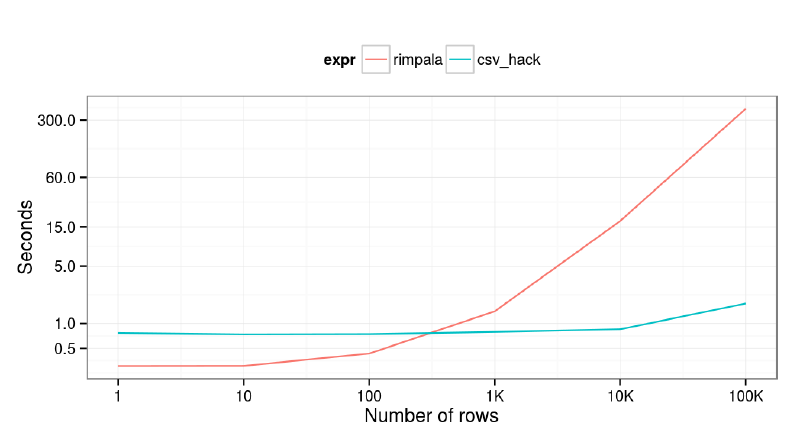
But this simple function is fair enough to do some quick benchmarks on how JDBC and the CSV export/import hack performs with different number of rows fetched from Impala. Let’s run a loop to load 1, 10, 100, 1K, 10K and 100K values from the database via the two methods, each repeated by 10 times for future comparison:
>benchmarks<-lapply(10^(0:5),function(limit){+query<-paste('select id from books limit',limit+1)+res<-microbenchmark(+rimpala=rimpala.query(query),+csv_hack=query_impala(query),+times=10)+res$limit<-limit+res+})
And let’s transform the results of the benchmarks to an aggregated data.table, and plot the averages on a joint (log-scaled) graph:
>df<-rbindlist(benchmarks)[,.(time=mean(time)),by=.(expr,limit)]>library(ggplot2)>ggplot(df,aes(x=limit,y=time/1e9,color=expr))+geom_line()++scale_y_log10(breaks=c(0.5,1,5,15,60,60*5,15*60))++scale_x_log10(breaks=10^(0:5),+labels=c(1,10,100,'1K','10K','100K'))++xlab('Number of rows')+ylab('Seconds')++theme_bw()+theme('legend.position'='top')
Unfortunately, I did not have patience to run this benchmark on more rows or columns, but this is already rather impressive in my (personal) opinion. In short, if you are querying more than a 100 rows from Impala and you have (SSH) console access to the server, you’d better use CSV export instead of waiting for the JDBC driver to deliver the data for you.
Quick comparison of the CSV export and the RImpala approach#
Please find this quick comparison of the discussed methods for fetching data from Impala to R:
Advantages
Disadvantages
RImpala
- Can connect to remote database without SSH access - On CRAN
- Slow when querying many rows - Java dependency on the client side - 20 megabytes of jar files for the driver
CSV export
- Scales nicely - No Java and jar dependencies, it’s damn simple
- Needs SSH access for remote connections - Not on CRAN (yet)
So why is it happening? I was not 100% sure, but suspected it must be something with the jar files or how those are used in R. The query takes the very same amount of time inside of Impala as it does not matter if you export the data into a CSV file or pass it via the JDBC driver, but parsing and loading it takes extremely long with the latter.
Mentioning these interesting results to Szilard at a lunch, he suggested me to give a try directly querying Impala with the RJDBC package. It sounded pretty insane to use a different R wrapper to the very the same jar files of the RImpala package, but I decided to do this extra test after all to make sure it’s a Java and not an R implementation issue – as per my proposal of keeping things simple (KISS) over using Java.
So I unzipped all the jar files used by the RImpala package above and created a new archive containing the merged content in a file named to impala-jdbc-driver.jar. Then loaded the RJDBC package and initialized a connection:
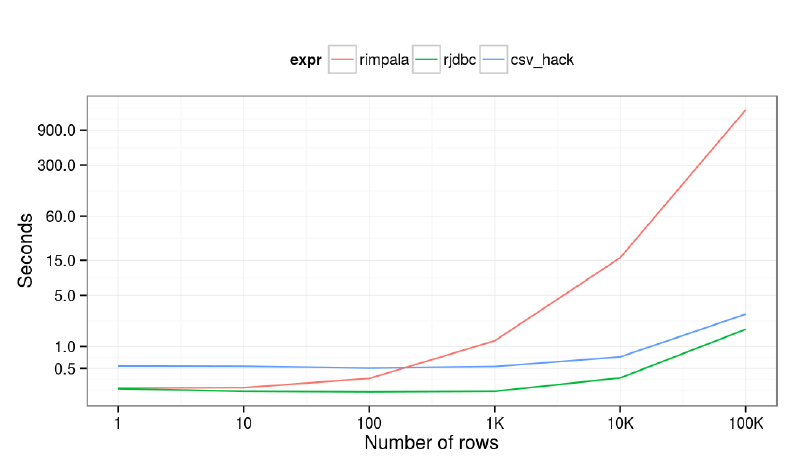
Then we can use the very convenient dbGetQuery method from the DBI package to fetch rows from Impala, with the following impressive results:
So my hypothesis turned out to be wrong! The JDBC driver performs pretty well, even better compared to the CSV hack. I was even tempted to revert our production R scripts to use JDBC instead of the below function using temporary files to read data from Impala, but decided to keep the non-Java approach for multiple reasons after all:
No memory issues when loading large amount of data. By default, the rJava packages starts JVM with 512 MB of memory, which might not be enough for some queries, so you have to update this default value via eg options(java.parameters = '-Xmx1024m') before loading the rJava package.
I prefer using SSH to access the data even if SSL encryption is available with the JDBC driver as well. This might sound silly, but managing users and authentication methods can be a lot easier via traditional Linux users/groups compared to Impala, especially with older CDH releases. Not speaking about in-database permissions here, of course.
Although JDBC can be perfect for reading data from Impala, writing to the database might be a nightmare. I am not aware of any bulk import feature via the JDBC driver, and separate INSERT statements are extremely slow. So instead of preparing SQL statements, I prefer creating an intermediary dump file to be imported by Impala on the command line – via a helper R function that does all these steps automatically. I did not prepare any benchmarks on this, but believe me, it’s a LOT faster. The same also stands for eg Redshift, where loading data from S3 or remote hosts via SSH and using COPY FROM instead of INSERT statements can result in multiple orders of magnitude speedup. This hack seems to be used by the Spark folks as well.
Proof-of-concept demo function to use intermediary CSV files to export data from Impala#
If you find this useful, please see the below function to automate the required steps of using an intermediary file instead of JDBC to load data from Impala :
connect to a remote host via SSH
create a temporary CSV file on the remote host
dump the results of the Impala query to the CSV file
copy the CSV to a local file
read the content of the CSV
clean up the local and remote workspaces.
Comments and any kind of feedback is highly welcomed!
#' Connect and query Imapala via SSH and Impala-shell#' @param query SQL query to run#' @param host server hostname or IP#' @param log enable or disable logging of debug/trace messages#' @return data.table object#' @exportquery_impala<-function(query,host='localhost',log=require(futile.logger)){## measure time of querytimer<-proc.time()## make sure the query is a one-linerquery<-gsub('\n',' ',query)## try to connect and create a remote temp fileif(log)flog.trace('Connecting to %s and creating tempfile.',host)rfn<-system(paste0('ssh ',host,' "mktemp --tmpdir=/tmp rimpala-XXXXXXXX.csv"'),intern=TRUE)## error handlingif(length(rfn)==0){stop('SSH access error.')}if(log)flog.trace('Remote tempfile: %s',rfn)## build impala-shell querycmd<-paste('impala-shell -B --quiet -q',shQuote(query),'-o',rfn,'"--output_delimiter=,"','--print_header > /dev/null')## and log then run itif(log)flog.trace(paste0('Querying impala-shell directly via: ',cmd))system(paste('ssh',host,shQuote(cmd)))## copy CSV file to localhostlfn<-tempfile(pattern='rimpala-',fileext='.csv')if(log)flog.trace('Copying tempfile to temporary location on localhost: %s',lfn)system(paste0('scp -q -C ',host,':',rfn,' ',lfn))## read data like a proif(log)flog.trace('Reading %s bytes of data.',file.info(lfn)$size)res<-tryCatch(fread(lfn,sep=','),error=function(e)e)## if we cannot read data as a proif(inherits(res,'error')){res<-data.table(read.csv(lfn))}## cleanupif(log)flog.trace('Deleting temporary files on localhost and remote.')unlink(lfn)system(paste('ssh',host,'rm',rfn))## log query timeif(log)flog.trace('Query finished with %s rows after %s seconds.',nrow(res),round(as.numeric(proc.time()-timer)[3],2))## returnres}
The LA Data Warehouse, Business Analytics and Analytics meetup had a fantastic first event with a great audience (full house), an awesome host (thanks Edmunds: Punnoose for taking the lead and the Team onsite and helping) and a great mix of 3 talks overviewing the field.
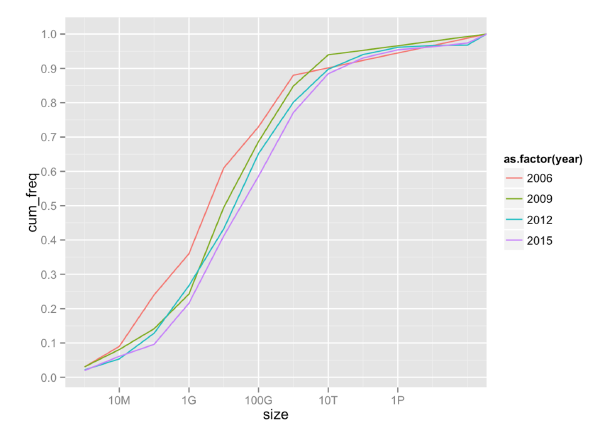
With so much hype about “big data” and the industry pushing for “big data” analytical tools for everyone, the question arises how many people have big data (for analytics) and how many of them really need these tools (which are more complex and often more immature compared to the traditional tools for analytics).
Update: Slides click here.
Video recording here:
This video is no longer available on YouTube (original link).
Stream processing with R in AWS
by Gergely Daróczi
Abstract: R is rarely mentioned among the big data tools, although it’s fairly well scalable for most data science problems and ETL tasks. This talk presents an open-source R package to interact with Amazon Kinesis via the MultiLangDaemon bundled with the Amazon KCL to start multiple R sessions on a machine or cluster of nodes to process data from theoretically any number of Kinesis shards. Besides the technical background and a quick introduction on how Kinesis works, this talk will feature some stream processing use-cases at CARD.com, and will also provide an overview and hands-on demos on the related data infrastructure built on the top of Docker, Amazon ECS, ECR, KMS, Redshift and a bunch of third-party APIs.